Grumpy Cat Weather
- 4.9
- Rating
- 100.00K
- Installs
- Free
- Price
 Analysis by App-foxy
I enjoy weather apps that tell me what I need without turning a quick check into a research project, but I also appreciate a little personality. Grumpy Cat Weather takes that second idea seriously: it presents weather information through the famously unimpressed attitude of Grumpy Cat, making an ordinary forecast feel more playful. After spending time with it, I found that its appeal is less about replacing every serious weather tool and more about making routine checks pleasant enough that I actually want to open the app.
This is a free weather app from Weather Creative Inc., aimed at Teen users and available for Android devices running version 7.0 or later. It has built a particularly strong audience, with an average rating of 4.9 from around 19 thousand ratings, roughly 5.2 thousand written reviews, and over 100 thousand installs. Those figures suggest that the humor is not just a novelty for a handful of people. Still, popularity does not automatically make it the right weather companion for everyone, so I paid attention to the moments where the experience feels smooth and the moments where a more conventional forecast app would be the safer choice.
What makes the first weather check easy—and where it can become confusing
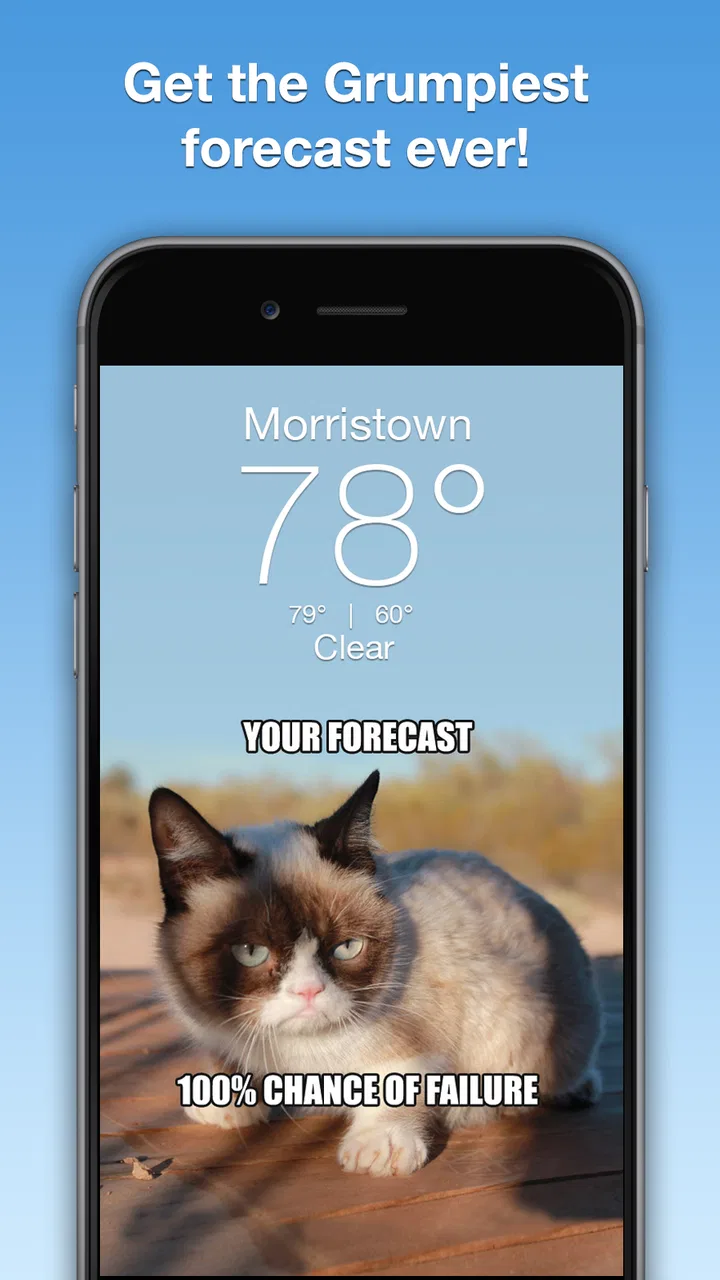
The central idea is immediately understandable. You open the app, look at the current weather or forecast, and get Grumpy Cat’s expressive reaction alongside it. That gives the app a clear identity from the first use. Instead of presenting weather as a wall of symbols and numbers, it adds an emotional layer: sunny conditions can feel cheerful, while unpleasant weather receives the appropriately sour treatment.
You May Also Like

 Blood Strike: 2.5 Anniversary
Blood Strike’s Loadouts Turn Every Drop Into a Tactical Gamble
A close look at Blood Strike’s custom loadouts: how fast access to signature weapons reshapes its battle royale rhythm, rewards preparation, and narrows the gap between fights.

 Pandora - Music & Podcasts
Pandora’s Music Is Easy to Start, but Harder to Recover
Pandora’s strength is its low-effort path from a seed to a station. Its weak spot is how much confidence it asks you to place in connection, setup, and quiet recovery.

 8 Ball Pool
 Is Built on Rivalries, Rematches, and Routine
A close look at the rivalries, rematches, shared routines, and unanswered safety questions that turn a quick pool match into a persistent mobile community.

 Samsung Music
’s Quiet Strength Is Playing What You Already Own
Its reach comes less from spectacle than from dependable access to a personal library. That simplicity is both the app’s strongest retention engine and its ceiling.

 AccuWeather: Weather Radar
AccuWeather Review: A Quick, Clear Forecast for Everyday Decisions
For everyday plans, the best forecast is the one you can understand quickly. AccuWeather makes rain timing, radar, and local conditions easy to act on, with a few trade-offs.

 Hill Climb Racing
Why Hill Climb Racing Still Turns Crashes Into One More Run
A tiny car, a bumpy hill and one more upgrade: Hill Climb Racing keeps resurfacing because its simple chaos makes every near-miss feel personal.
More From Our News Desk



That personality is also the first place where expectations need to be managed. This is not the kind of app I would choose when I need a detailed planning dashboard for a long trip, outdoor work, or a weather-sensitive activity. Its strength is the quick glance. If you want a compact way to decide whether to take an umbrella, wear a jacket, or wait before leaving, the playful presentation works well. If you expect extensive meteorological explanation, the character-driven design may feel too light.
One practical point is that a weather app can appear to be malfunctioning when the real issue is simply that the displayed location is not the one you intended. During setup, I would check the selected place carefully rather than assuming the app has automatically chosen the correct one. A forecast can look perfectly normal while still being useless if it belongs to a nearby town, an old saved location, or a place selected during an earlier test.
I also recommend giving the first screen a calm inspection instead of tapping through it quickly. Identify which part represents current conditions and which part refers to upcoming weather. The grumpy reactions are easy to notice, but the practical information should remain the reason you are checking the app. I found the experience more useful when I treated the humor as a visual cue rather than as a substitute for reading the actual forecast.
Setup checks that prevent most everyday frustration
Because the app is free to download, it is easy to install it on a spare device or try it alongside an existing weather tool. That makes comparison simple, but it can also create confusion if both apps are showing different places or updating at different moments. Before deciding that Grumpy Cat Weather is inaccurate, I would compare the location, the time of the forecast, and the type of information being displayed. Two apps can disagree without either one being broken.
The minimum operating-system requirement is Android 7.0, so older devices should be checked before installation. If the app cannot be installed or behaves unexpectedly on an aging phone, compatibility is the first sensible checkpoint. The current version is 6.2.7, which is useful to know when troubleshooting because an outdated installation can behave differently from the current release.
Another setup habit I found worthwhile is restarting the app after the initial installation rather than judging it during the first few seconds of use. A fresh launch gives the interface a chance to settle and makes it easier to distinguish a temporary loading delay from a persistent problem. I would also avoid changing several settings at once. If the location, device connection, and app state all change together, it becomes difficult to identify what actually fixed or caused the issue.
The app is free, but it includes optional in-app purchases ranging from $1.99 to $29.99 per item. That matters if you are installing it for a child or on a shared device. I would review the purchase controls before handing the phone over, especially because the Teen content rating does not mean every user will have the same expectations about spending. The core appeal is accessible without treating the app like a paid professional weather service, but optional purchases are still part of the ownership experience.
For a first-time user, my preferred setup sequence is simple:
- Confirm that the phone meets the Android requirement and that the installation is complete.
- Check the displayed location instead of relying on a familiar-looking forecast.
- Close and reopen the app once after the first launch.
- Compare one current condition with another trusted weather source before planning something important.
- Review purchase protections if the device is shared.
That sequence is not glamorous, but it prevents a surprisingly common mistake: blaming the app for a location or device problem that was present before the forecast was even read.
Recovering a weather-check routine when something feels wrong
My most useful recovery method is to reduce the problem to one question: is the issue with the display, the location, or the freshness of the forecast? If the screen looks unusual but the place is correct, I would close the app and open it again. If the information looks plausible but does not match my surroundings, I would recheck the location before doing anything more drastic. If the forecast seems old, I would give the app another opportunity to refresh rather than repeatedly tapping the same area.
Repeatedly reopening an app in quick succession is not always helpful. It can make a temporary connection delay feel like a permanent failure, and it gives you no clear clue about what changed. I prefer one clean restart, followed by a comparison with conditions outside or with another weather source. This is especially important when the sky is changing quickly: the weather may have shifted after the app’s last update, rather than the app having displayed the wrong information.
A useful everyday workflow is to check the app at the same moments you already make decisions. For example, before leaving for work, I look at the current condition first and then the near-term outlook. I do not use the character’s mood as the deciding factor; I use it to make the check memorable, then confirm whether I need a coat, umbrella, or different shoes. At lunchtime, I can repeat the glance without opening a complicated map or scrolling through technical charts.
That workflow also reveals one of the app’s less obvious trade-offs. The personality encourages frequent checking, which is enjoyable, but frequent checking can become a distraction if you only want essential information. I would keep it as a light daily tool rather than turning every weather change into an event. Its best rhythm is quick, intentional visits, not constant refreshing.
If the app opens normally but you dislike the way the information is presented, that is not really a troubleshooting problem. It may simply be a mismatch between the app’s style and your needs. Some people want a forecast to feel friendly; others want the least decorative route to temperature, precipitation, wind, and timing. No amount of restarting will change that preference, so it is better to recognize it early.
When the app is not the cause of a disappointing forecast
Weather forecasting is inherently changeable, and a correct forecast can become less useful as conditions develop. I would be cautious about judging Grumpy Cat Weather from a single surprising afternoon. Instead, compare the displayed location and forecast period, then check whether other weather sources are reporting the same uncertainty. If several services differ, the problem may be the weather itself rather than this particular app.
Location errors are another frequent source of false criticism. A phone can be physically near one area while the app is set to another, and a small geographic difference can matter during local showers or temperature changes. Before leaving a negative assessment, I would make sure the forecast is for the place where I am actually going, not simply the place I last searched.
Device conditions can matter too. An older phone that meets the minimum requirement may still feel less responsive than a newer one, particularly if many other apps are open. A slow launch does not necessarily mean the weather information is wrong. I would distinguish between performance friction and forecast quality: one is about the device experience, while the other is about whether the information helps me make a decision.
The same distinction applies to internet access. If the app cannot update promptly, the last visible forecast may not reflect the latest conditions. I would avoid making an important outdoor decision based solely on a screen that appears unchanged after a connection problem. Checking again later, comparing with another source, or simply looking at the conditions outside is sensible. This is not a criticism unique to this app; it is a basic limitation of relying on any connected weather service.
There is also a human factor. The expressive reactions can make a forecast feel more definitive than it really is. A dramatic face may suggest certainty even when the underlying situation is variable. I found it best to treat the reaction as presentation, not probability. For ordinary errands that distinction is easy to manage. For travel, safety decisions, or work that depends heavily on conditions, I would consult a more detailed source as well.
How it compares with ordinary weather alternatives
Compared with a standard weather app, Grumpy Cat Weather is more memorable and less formal. A conventional tool usually wins when I need dense information, multiple layers of detail, or a serious planning interface. This app wins when I want a quick answer with a recognizable personality. The choice is not really between “accurate” and “fun” based on appearance alone; it is between different ways of consuming the same everyday category of information.
I would choose a traditional weather service for a flight day, a long hike, a construction shift, or any plan where timing and changing conditions deserve close attention. I would choose this app for a casual morning glance, a shared family phone, or someone who tends to ignore weather apps because they feel dull. The character gives the routine a small emotional hook, and that can make a difference for users who otherwise forget to check before going out.
It is also a good fit for fans of Grumpy Cat who want a themed experience rather than a generic utility. The theme is not an occasional decoration added to an otherwise ordinary interface; it shapes the tone of the whole interaction. That focus is a strength if you enjoy it and a limitation if you prefer neutral design.
On the other hand, I would skip it if I need a professional-looking reference, extensive customization, or a single app for every possible weather-planning task. I would also think twice if I dislike character-based interfaces or if optional purchases on a shared device would create unnecessary supervision. Free access makes trying it low-risk, but it does not remove those practical considerations.
The Teen rating is another small but relevant detail for families. I would not interpret it as a guarantee that the app will suit every younger user, nor would I assume that the rating answers questions about spending or device supervision. Parents should still decide whether the tone, purchase setup, and general phone use are appropriate for their household.
My practical verdict after using it as a daily check
Grumpy Cat Weather works because it understands that many weather checks are tiny decisions, not scientific investigations. I can open it before leaving home, read the essential condition, enjoy the reaction, and move on. That is a real advantage for people who want a little warmth and humor in a category that often feels purely functional.
My strongest recommendation is to use it as a convenient first look, while keeping a more detailed source available for situations where weather has serious consequences. That is not a weakness unique to this app; it is the sensible boundary for a character-focused weather experience. The app is at its best when it helps me build a checking habit, not when I expect it to replace every specialized forecast tool.
The developer, Weather Creative Inc., has positioned the app around a very specific personality, and the result feels more focused than a generic themed skin. The high average rating and substantial user response show that this approach resonates with many people. I would still test the location behavior and the overall presentation during an ordinary week before relying on it for important plans.
In the end, I recommend it to anyone who wants weather information to feel less dry, especially Grumpy Cat fans and casual users who appreciate a fast, amusing glance. I would steer detail-oriented planners toward a conventional alternative, and I would remind every new user to verify the location, distinguish a refresh problem from a forecast change, and protect optional purchases on shared devices. The best way to enjoy this app is to let the grumpiness add personality while you keep the actual weather decision grounded in the information on screen.
FAQs for Grumpy Cat Weather
01What is Grumpy Cat Weather?
Grumpy Cat Weather is a weather app built around the famous Grumpy Cat character, combining everyday forecasts with humorous graphics, expressions, and themed messages. It is designed to make checking the weather more entertaining while still presenting useful information such as current conditions, temperatures, and upcoming forecasts. The exact features and presentation may vary depending on the version installed and the device platform.
02What weather information does Grumpy Cat Weather provide?
The app generally focuses on practical weather details, including current temperature, weather conditions, and forecasts for the hours or days ahead. Depending on the available version, it may also show additional information such as precipitation, wind, or humidity. Before relying on it for travel, outdoor work, or severe-weather decisions, users should compare its information with an official local weather service.
03Is Grumpy Cat Weather free to download and use?
Grumpy Cat Weather may be available as a free download, although availability, advertising, optional purchases, and included features can differ between Android and iOS versions. Some editions may provide the basic forecast at no cost while using ads or offering extra content through in-app purchases. Check the store listing carefully for pricing, subscriptions, and purchase requirements before downloading.
04Does Grumpy Cat Weather require location access?
Location permission may be requested so the app can automatically identify your current city and display a local forecast. You can usually deny this permission and enter a location manually, depending on the version of the app. If privacy is important to you, review the permission request and the developer’s privacy policy, and consider allowing location access only while the app is being used.
05Is Grumpy Cat Weather suitable for severe weather alerts?
Grumpy Cat Weather is primarily an entertaining forecast app and should not be treated as the only source for emergency information. Its alerts, update frequency, and coverage can depend on the underlying weather data service and your region. For storms, hurricanes, floods, extreme temperatures, or other dangerous conditions, use official government alerts and local meteorological services in addition to any information shown by the app.
Pros
- Playful Grumpy Cat theme makes routine forecasts more entertaining.
- Quick access to current conditions and upcoming weather information.
- Simple layout is easy to understand at a glance.
- Useful for casual users who prefer a lighthearted weather app.
- Weather updates can help with everyday planning and outdoor activities.
Cons
- The humorous design may feel less professional than standard weather apps.
- Forecast accuracy depends on the underlying weather data provider.
- Some features or content may require an internet connection.
- Limited customization may disappoint users wanting detailed weather tools.
- Older devices may experience compatibility or performance limitations.

Grumpy Cat Weather
Gallery